Data Table Settings
Each row in the Foliage Data Table (row structure FoliageData) describes one resource, such as a tree or a rock.
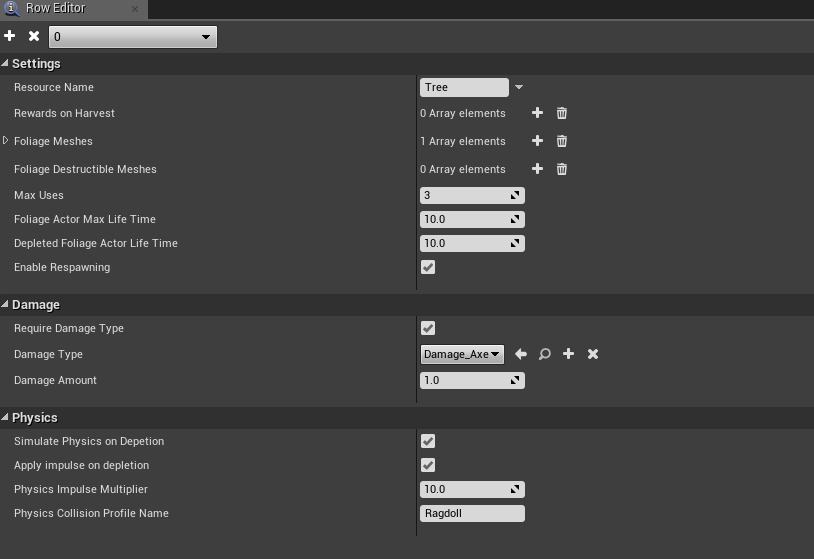
note
The screenshot is from an older version. Foliage Actor Class has since been added, and Damage Type is now the Valid Damage Types list.
Settings
| Column | Default | Description |
|---|---|---|
| Resource Name | A display name for the resource, for example Tree. | |
| Rewards on Harvest | The rewards given on each harvest. Each reward has a Reward Name and a Number of Rewards with Min and Max. You pick the actual amount when you receive the reward, see Harvesting Foliage. | |
| Foliage Meshes | The static meshes that belong to this resource. A foliage instance uses this row when its mesh is in this list. A mesh should only be in one row. | |
| Destructible Meshes | Optional destructible versions of the meshes, at the same index as in Foliage Meshes. Geometry Collections in UE5, Destructible Meshes in UE4. See Destructible Meshes. | |
| Foliage Actor Class | None | The Foliage Actor spawned when an instance takes damage. Required. |
| Max Uses | 3 | How many times the resource can be harvested before it is depleted. |
| Foliage Actor Max Life Time | 120 | Seconds before a Foliage Actor that was not depleted is destroyed. Extended while a player is nearby. |
| Depleted Foliage Actor Life Time | 30 | Seconds a depleted Foliage Actor stays before it is destroyed. |
| Enable Respawning | On | When on, the instance respawns after the actor is gone. When off, it is removed for good. |
See Lifecycle of a Foliage Instance for how uses and lifetimes work together.
Damage
| Column | Default | Description |
|---|---|---|
| Require Damage Type | Off | Only accept hits that pass the damage check below. |
| Valid Damage Types | The damage types that can harvest this resource. | |
| Damage Amount | 1 | The minimum damage per hit. |
See Damage Types.
Physics
| Column | Default | Description |
|---|---|---|
| Simulate Physics on Depletion | Off | Simulate physics when depleted, for example a falling tree. Ignored if the resource has a destructible mesh. |
| Apply Impulse on Depletion | Off | Push the mesh with an impulse when it starts simulating. |
| Physics Impulse Multiplier | 10 | Strength of the impulse. |
| Physics Collision Profile Name | None | Collision profile to use while simulating. None keeps the current profile. |
See Simulating Physics.