Simulating Physics
To make a tree fall over when it has been harvested, let the Foliage Actor simulate physics on depletion.
Step 1: Set up collision on the mesh
The mesh needs simple collision to simulate physics. Do this for every mesh that should simulate physics. See Collision Setup.
Step 2: Enable physics in the Data Table
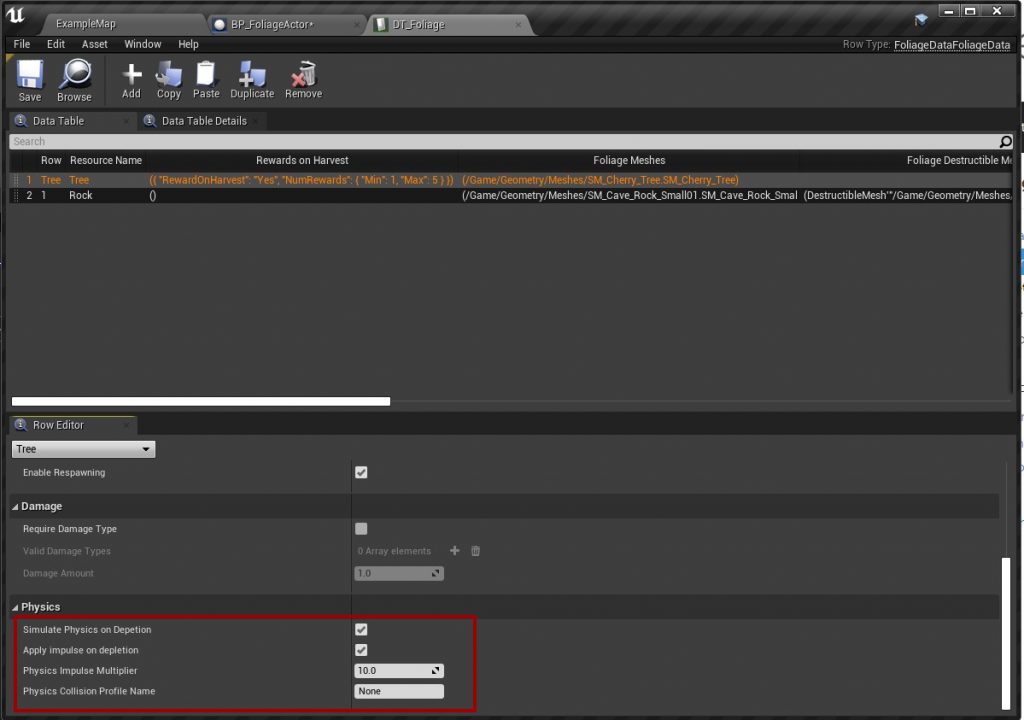
In the resource's row in the Foliage Data Table, turn on Simulate Physics on Depletion and Apply Impulse on Depletion.
| Setting | Description |
|---|---|
| Simulate Physics on Depletion | The mesh starts simulating physics when the actor is depleted. |
| Apply Impulse on Depletion | Pushes the mesh with an impulse, so it falls over instead of standing still. |
| Physics Impulse Multiplier | Strength of the impulse. Increase it if heavy meshes do not fall over. |
| Physics Collision Profile Name | Collision profile used while simulating, for example a profile that ignores Pawns. None keeps the current profile. |
Troubleshooting
- The tree does not fall over. Increase Physics Impulse Multiplier. The plugin applies the impulse near the top of the mesh in a random direction, scaled by the mesh's mass, but very heavy meshes can still need more force.
- Physics does not start at all. The mesh has no simple collision, or the row has a destructible mesh. Physics on depletion is disabled when a destructible mesh is used.
- Players are pushed by falling trees. Set Physics Collision Profile Name to a profile that ignores Pawns.
- Positions differ between players. See Physics movement.
To push the mesh in your own way, override Handle Foliage Impulse on Depletion in your Foliage Actor. See Foliage Actor.