Logging and Debugging
Log category
The plugin logs to the LogFoliagePlugin category. Warnings and errors are always shown. To see what the plugin does "under the hood", enable verbose logging.
For a single session, use the console command:
Log LogFoliagePlugin Verbose
To keep it enabled, add this to Config/DefaultEngine.ini in your project. If the file already has a [Core.Log] section, add only the second line to it:
[Core.Log]
LogFoliagePlugin=Verbose
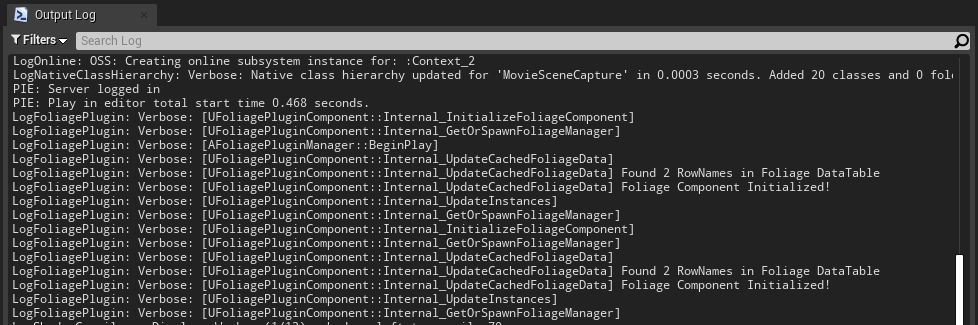
Example of verbose output:
On-screen debug messages
With Enable Debugging on in the Plugin Settings, the plugin prints problems on screen and to the log, and draws a sphere for every despawn and respawn blocking check: green when an object blocks, red when it does not. On-screen messages are not shown in Shipping builds.
Messages
| Message | Meaning |
|---|---|
| No foliage DataTable defined in Project Settings! | Foliage Data Table is not set. See Setting up Foliage. |
| Failed initializing foliage component! Could not find any matching data | A foliage component's mesh is not in Foliage Meshes in any row. Expected for foliage you do not want to harvest. |
| On Point Damage: Failed to Initialize Foliage Component, Check the Foliage DataTable! | A foliage instance took damage, but its mesh is not in the Data Table. |
| Foliage Actor class is invalid! Check your data table settings! | The row has no Foliage Actor Class. |
| On Point Damage: Failed spawning a Foliage Actor! | The Foliage Actor could not be spawned. |
| Foliage successfully harvested, but Instigator or DamageCauser does not implement the FoliageInterface! | Nothing received the reward. See Foliage Plugin Interface. |
| Found a Destructible Mesh but no Geometry Collection Component found on (X) | The row has a destructible mesh, but the Foliage Actor has no Geometry Collection Component (UE5) or Destructible Component (UE4). |
| Saved Foliage Component Data to Disk / Saving Foliage Component Data Failed! | Result of an automatic or manual save. |
| Loaded foliage data from disk / Failed loading foliage data from disk | Result of loading the save when the game starts. |
Finding the log file
Log files are written to your project's Saved/Logs folder.