Plugin Settings
The settings are in Project Settings → Game → Foliage Plugin and are saved in DefaultGame.ini.
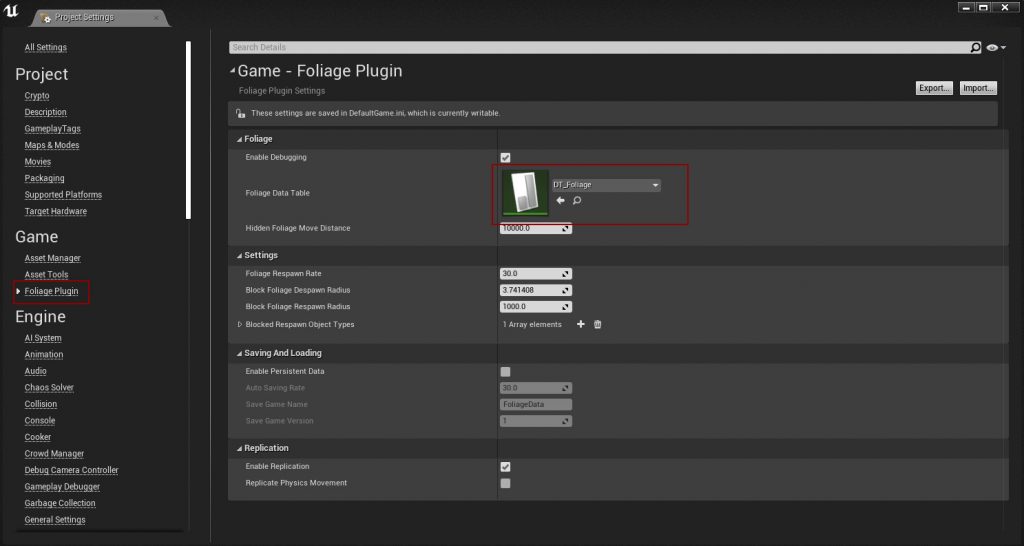
note
The screenshot is from an older version. Enable Replication no longer exists, replication is always on. Foliage Manager Class and Field System Actor are newer settings.
Foliage
| Setting | Default | Description |
|---|---|---|
| Enable Debugging | On | Shows on-screen debug messages and draws the blocking checks. See Logging and Debugging. Turn it off before you ship. |
| Foliage Data Table | None | The Data Table with your resources. Its row structure must be FoliageData. See Data Table Settings. |
| Foliage Manager Class | FoliagePluginManager | The manager class that is spawned automatically. See Custom Foliage Manager. |
| Hidden Foliage Move Distance | 10000 | How far down, in units on the Z axis, an instance is moved when it is hidden. |
Settings
| Setting | Default | Description |
|---|---|---|
| Foliage Respawn Rate | 60 | Seconds between respawn attempts. Minimum 10. See respawning. |
| Block Foliage Despawn Radius | 1000 | A Foliage Actor is not destroyed while an object of a blocked type is within this radius. |
| Block Foliage Respawn Radius | 1000 | An instance does not respawn while an object of a blocked type is within this radius. |
| Blocked Respawn Object Types | Pawn | Object types that block both despawning and respawning. Leave empty to never block. |
| Field System Actor | FS_MasterField | Unreal Engine 5 only. The Field System Actor spawned to break Geometry Collections. |
Saving and Loading
| Setting | Default | Description |
|---|---|---|
| Enable Persistent Data | Off | Saves hidden and removed instances between sessions. |
| Auto Saving Rate | 60 | Seconds between automatic saves. Minimum 5. |
| Save Game Name | FoliageData | Save slot name. |
| Save Game Version | 1 | A save with a different version is ignored and overwritten. |
See Saving and Loading.
Replication
| Setting | Default | Description |
|---|---|---|
| Replicate Physics Movement | Off | Replicates the movement of depleted actors that simulate physics. Costs bandwidth, only turn it on if the positions matter for gameplay. |